

An nginx 502 bad gateway fix starts with the upstream error in Nginx’s log. A 502 means Nginx could not get a valid response from the application server it contacted. For a PHP site, that upstream is often PHP-FPM, but a dead service, mismatched socket, exhausted workers, crashed application, or slow dependency can produce similar symptoms.
Identify the failure before changing production settings. A restart may temporarily restore service, but it can interrupt requests and erase useful evidence.
Need help with an active outage? OS Assistance can investigate Linux, Nginx, PHP-FPM, and control-panel incidents. Request emergency Linux support. Response timing and scope are confirmed when the request is reviewed.
What a 502 Bad Gateway error means
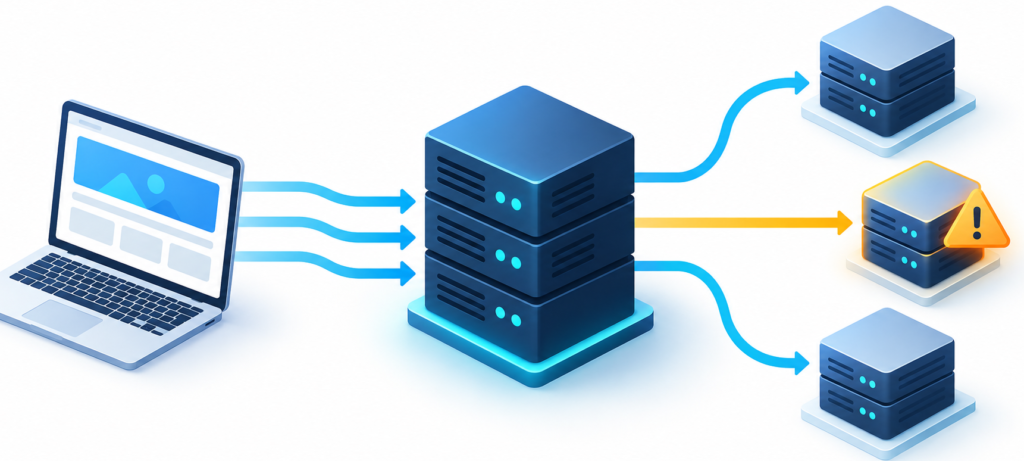
Nginx acts as a reverse proxy: it accepts a visitor’s request and passes it to an upstream service such as PHP-FPM. If that service refuses the connection, closes it unexpectedly, or returns a response Nginx cannot use, Nginx may return 502 Bad Gateway.
A slow upstream may instead produce 504 Gateway Timeout. The browser status and matching Nginx log line matter; do not treat every 502 or 504 as a PHP-FPM crash.
1. Read the Nginx error log first
Check the log while reproducing the affected URL. The location varies by distribution and hosting panel; /var/log/nginx/error.log is common on many Linux systems.
sudo tail -n 50 /var/log/nginx/error.log
sudo journalctl -u nginx --since "15 minutes ago" --no-pager
Match the timestamp and upstream to one failed request. Common signatures point to different checks:
| Log signature | Likely area to check |
|---|---|
connect() ... failed (111: Connection refused) | PHP-FPM is stopped, not listening on that address, or refusing connections. |
connect() ... failed (2: No such file or directory) | The socket path is missing or does not match the PHP-FPM pool. |
connect() ... failed (13: Permission denied) | Check socket ownership, mode, directory access, and SELinux or AppArmor denials. |
upstream prematurely closed connection | The upstream may have crashed, been killed, or closed before sending a complete response. |
upstream timed out | The application may be slow or blocked. Nginx commonly returns 504 for this; inspect the status and surrounding log lines. |
2. Check the correct PHP-FPM service
Service names vary by distribution, PHP version, and control panel. Find the installed unit before checking or changing it:
systemctl list-units --type=service --all | grep -E 'php.*fpm|plesk-php.*fpm'Then inspect the exact name shown by your server. Replace php8.2-fpm with the matching unit:
sudo systemctl status php8.2-fpm --no-pager
sudo journalctl -u php8.2-fpm --since "15 minutes ago" --no-pager
Look for failed starts, repeated crashes, out-of-memory messages, configuration errors, and pool warnings. Some systems write PHP-FPM logs to version-specific files instead of the system journal. Plesk can run separate services for different PHP versions.
3. Match Nginx’s upstream to the PHP-FPM listener
For a Unix socket, the active Nginx server block’s fastcgi_pass must match the PHP-FPM pool’s listen value. A version mismatch is common after changing PHP versions or upgrading a control panel.
# Example Nginx directive
fastcgi_pass unix:/run/php/php8.2-fpm.sock;

# Matching PHP-FPM pool directive
listen = /run/php/php8.2-fpm.sock
A TCP setup must match on both sides too, such as Nginx connecting to 127.0.0.1:9000 while the pool listens on that address and port. Keep PHP-FPM on a protected local or private network; never expose it to the public internet.
For a permission error, inspect the socket and parent directories using the actual path from your configuration:
stat -c '%A %U:%G %n' /run/php/php8.2-fpm.sock
namei -l /run/php/php8.2-fpm.sock
Check listen.owner, listen.group, and listen.mode against the Nginx worker user and distribution defaults. Avoid chmod 777; broad permissions weaken security and may not fix the mismatch. If SELinux or AppArmor is enabled, inspect denial logs instead of disabling the control.
4. Diagnose PHP-FPM worker exhaustion
When all PHP-FPM workers are busy, new requests wait in a queue. Slow PHP code, database queries, or external services can keep workers occupied until visitors see errors. A warning such as server reached pm.max_children shows that the pool reached its concurrency limit; it does not prove that raising the limit is safe.
Review pool settings, FPM logs, and process memory during representative peak traffic. This command gives a rough view of PHP-FPM processes and resident memory:
ps -eo pid,rss,comm,args --sort=-rss | grep '[p]hp-fpm' | head -20RSS is only an estimate because processes can share memory. Prefer proportional set size (PSS) when available, and measure under realistic load. Leave capacity for the operating system, database, Nginx, monitoring agents, caches, and traffic bursts.
A useful starting relationship is safe worker limit ≈ memory budget for PHP workers ÷ measured memory per busy worker. There is no universal operating-system reserve or fixed worker size for every application. Raising pm.max_children without measuring can exhaust RAM and cause the kernel to kill PHP-FPM or the database.
Check for slow requests and backend waits before increasing concurrency. PHP-FPM’s request_slowlog_timeout and slowlog settings can help locate PHP paths that hold workers too long. If you enable pm.status_path, restrict it to localhost or trusted monitoring addresses; the status page reveals operational details.
5. Treat timeouts and FastCGI buffers as targeted settings
fastcgi_read_timeout sets the maximum interval between successive reads from PHP-FPM; it is not a blanket limit on total script runtime. If a log reports upstream timed out, first check PHP-FPM slow logs, database performance, external calls, and the request’s expected duration. A higher timeout can keep workers occupied for longer.
FastCGI buffers handle response buffering, including unusually large response headers. Increase fastcgi_buffer_size or fastcgi_buffers only when a log or measured response shows a buffer problem. Larger buffers can use more memory across concurrent requests, so avoid copying a generic configuration into every site.
6. Apply and verify one change at a time
- Save the relevant configuration and capture current error and service logs.
- Make one evidence-based change in the correct Nginx server block or PHP-FPM pool.
- Test the Nginx configuration before reloading it.
sudo nginx -tIf the test succeeds, an Nginx reload applies the configuration while old workers can finish existing requests. On systemd systems, the command is commonly:
sudo systemctl reload nginxConfirm the reload succeeded, request the affected page, and watch both logs. Do not reload after a failed configuration test. PHP-FPM reload behavior varies by service unit, and a restart can interrupt in-flight requests. Check supported actions and use a maintenance window when the risk is unclear. Repeated restarts can hide the cause while the outage returns.
Prevent the next Nginx 502
- Alert on PHP-FPM queue length, active and idle workers, and “max children reached” events.
- Track PHP worker and database memory, swap activity, and kernel out-of-memory messages.
- Protect the PHP-FPM status page and enable a slow log where appropriate.
- Test PHP version changes and control-panel upgrades against the active socket or TCP listener.
- Investigate slow application and database paths before raising worker limits or timeouts.
- Keep disk space available for logs and temporary files. See our Linux disk space recovery guide if a full filesystem is part of the incident.
Frequently asked questions
Will restarting PHP-FPM fix an Nginx 502?
It may restore service if PHP-FPM is stuck or stopped, but it does not explain the cause. Capture logs first when possible, confirm the exact unit and pool, and expect that a restart can interrupt active requests.
Does a 502 always mean PHP-FPM is down?
No. A wrong socket, permission issue, worker exhaustion, application crash, or another upstream service can also produce a 502. Use the error log to identify which upstream failed.
Should I set pm.max_children to 200?
Only if measured worker memory and available RAM support that concurrency under real load. An arbitrary high limit can exhaust memory and trigger kernel out-of-memory kills.
Should I increase fastcgi_read_timeout?
Only when the application has a justified long-running request and the log confirms a read timeout. Check slow PHP code, database locks, and unavailable dependencies first.
Can I change the socket to mode 777?
No. Check the configured socket path and the pool’s owner, group, and mode. Broad permissions weaken security and may not solve the underlying mismatch.
Which Linux distributions and PHP versions does this apply to?
The diagnostic approach applies to common systemd-based Linux servers running Nginx and PHP-FPM. Service names, socket paths, log locations, and control-panel behavior vary, so verify them on the affected server.
How can I get ongoing help with recurring Nginx and PHP-FPM problems?
OS Assistance’s Linux Care plan is $4,000 per month for unlimited Linux servers, with one active workstream at a time. Requests are triaged and planned within 24 hours during service hours; delivery timing depends on scope, access, and external dependencies. Discuss whether Linux Care fits your environment.