Note: the links and images in this document may point to external sources. Please review them before opening.
SEO & CMS Configuration
| SEO Parameter | Recommended Production Value |
|---|---|
| Focus Keyword | cicd pipeline for Linux infrastructure |
| SEO Title Tag | `A Practical CI/CD Pipeline for Linux Changes: Safe Deployments & Zero Downtime \ |
| Meta Description | Build a safe cicd pipeline for linux infrastructure. Step-by-step production guide with GitHub Actions, GitLab CI, Ansible dry runs, and automated rollbacks. |
| URL Slug | cicd-pipeline-for-linux-infrastructure |
| Target URL | https://pro.osassistance.com/blog/ci-cd/cicd-pipeline-for-linux-infrastructure |
| Category | CI/CD (/blog/ci-cd/) |
| Author Byline | Written by Thomas C (20+ Years Enterprise Linux Engineering) |
| Copyright Notice | © 2026 OS Assistance (osassistance.com). All Rights Reserved. |
A Practical CI-CD Pipeline for Linux Changes: Safe Deployments, Automated Validation, and Zero Downtime
Written by Thomas C (20+ Years Enterprise Linux Engineering)
Published by OS Assistance — Dedicated Linux Systems Care & Infrastructure Automation
For software development teams, Continuous Integration and Continuous Deployment (CI/CD) is second nature. Code is committed, unit tests execute in containerized runners, linters inspect syntax, and pull requests are merged only after automated validation succeeds.
Yet, when managing the underlying Linux operating systems—patching production kernels, updating Nginx reverse proxy configs, deploying SSL certificates, or modifying systemd daemon flags—many organizations still resort to manual, high-risk practices: an engineer logs in via SSH as root, edits a live configuration file in /etc/, manually restarts the service, and crosses their fingers.
This manual workflow causes configuration drift, silent failures during node reboots, and undocumented outages that can cripple production services.
Over 20+ years of enterprise Linux architecture across Fortune 500 environments (including IBM, UPS, Deloitte, and Tier-1 banking estates), I have engineered infrastructure deployment models based on an essential principle: every production Linux modification must pass through a version-controlled, automated CI-CD pipeline.
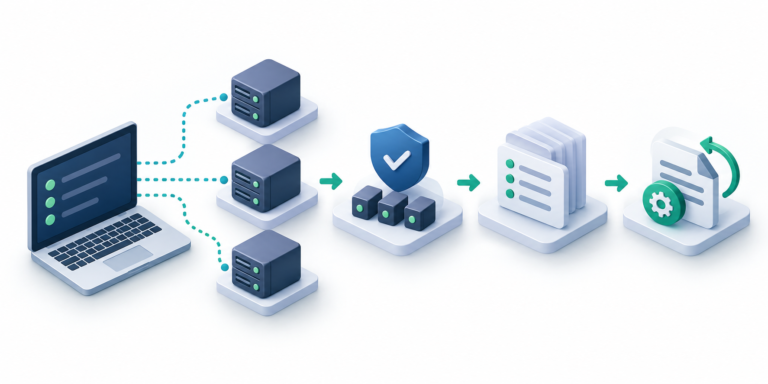
Here is a practical, step-by-step engineering blueprint for implementing a CI/CD pipeline for Linux infrastructure—using GitHub Actions or GitLab CI with Ansible—to ensure predictable rollouts, automated dry runs, and zero unplanned downtime.
+-------------------------------------------------------------------------+
|             THE 4-STAGE LINUX INFRASTRUCTURE CI/CD PIPELINE             |
+-------------------------------------------------------------------------+
|                                                                         |
|  [STAGE 1: LINT & SYNTAX]                                              |
|   • YAML Syntax Check (yamllint)                                        |
|   • Ansible Best Practices (ansible-lint)                               |
|   • Idempotency & Variable Validation                                   |
|                  │                                                      |
|                  ▼                                                      |
|  [STAGE 2: DRY-RUN SIMULATION]                                          |
|   • Triggered automatically on Pull Request                             |
|   • ansible-playbook --check --diff                                     |
|   • Inspect exact file changes without touching disk                    |
|                  │                                                      |
|                  ▼                                                      |
|  [STAGE 3: ROLLING PRODUCTION DEPLOYMENT]                               |
|   • Triggered on merge to 'main' branch                                 |
|   • Batch execution via serial: "25%" or serial: 1                      |
|   • Native OpenSSH authentication via agentless SSH keys                |
|                  │                                                      |
|                  ▼                                                      |
|  [STAGE 4: AUTOMATED HEALTH VERIFICATION]                              |
|   • Post-flight systemd service assertions                              |
|   • HTTP/2 / TLS endpoint probe & port checks                          |
|   • Automated rollback alert or git-revert execution                    |
|                                                                         |
+-------------------------------------------------------------------------+
1. The Core Architecture of a Safe Linux CI-CD Pipeline
A robust CI/CD pipeline for Linux infrastructure differs fundamentally from application deployment pipelines. When deploying application code, containers or serverless functions can simply be destroyed and replaced. When managing stateful Linux operating systems (hosting live databases, localized caches, or file storage), destructive resets are unacceptable.
To ensure stability across multi-cloud, virtualized (VMware, Proxmox), or bare-metal Linux servers, your pipeline must adhere to four non-negotiable rules:
- Pull-Request Dry Runs (
--check --diff): No configuration should ever touch production without an automated dry run executed and reviewed in the pull request comments. - Dedicated, Unprivileged CI Service User: The CI runner must authenticate via a dedicated SSH key tied to a service account (e.g.,
ansible-ci) with strictly scopedsudoersprivileges and detailed audit logging. Shared root credentials must never be embedded in CI secrets. - Rolling Canary Batches (
serial: "25%"): Never update your entire fleet simultaneously. Update a fraction of your nodes first, verify their health, and proceed only if zero errors occur. - Declarative Git Audit Trail: The
mainbranch of your repository must serve as the single source of truth. If a parameter is not committed to Git, it does not exist on the server.
2. Setting Up the Repository Structure
Organize your Linux infrastructure repository cleanly to ensure seamless CI/CD integration:
infrastructure-fleet/
├── .github/
│   └── workflows/
│       └── linux-deploy.yml          # GitHub Actions workflow definition
├── inventory/
│   ├── staging.ini                   # Staging server IPs & groups
│   └── production.ini                # Production server IPs & groups
├── group_vars/
│   ├── all.yml                       # Global variables & NTP/DNS baselines
│   └── webservers.yml                # Nginx/PHP-FPM variables
├── roles/
│   ├── baseline_security/            # UFW, fail2ban, SSH hardening
│   ├── os_patching/                  # Automated security patching
│   └── web_stack/                    # Nginx, TLS vhosts, PHP-FPM
├── site.yml                          # Master site playbook
└── ansible.cfg                       # Pipeline SSH timeout & pipelining config
3. Production Workflow 1: GitHub Actions for Linux Infrastructure
Below is an enterprise-grade GitHub Actions pipeline configuration. It automatically performs linting and dry runs on every Pull Request, requiring a merge to main before executing live rolling changes across your Linux estate:
# .github/workflows/linux-deploy.yml
name: Linux Infrastructure Deployment Pipeline

on:
  pull_request:
    branches: [ main ]
  push:
    branches: [ main ]

jobs:
  lint-and-validate:
    name: 1. Lint & Syntax Validation
    runs-on: ubuntu-latest
    steps:
      - name: Checkout Repository
        uses: actions/checkout@v4

      - name: Set up Python
        uses: actions/setup-python@v5
        with:
          python-version: '3.11'

      - name: Install Ansible & Linters
        run: |
          pip install ansible-core yamllint ansible-lint

      - name: Run YAML Lint
        run: yamllint .

      - name: Validate Ansible Playbook Syntax
        run: |
          ansible-playbook -i inventory/production.ini site.yml --syntax-check

  dry-run-check:
    name: 2. Execution Dry Run (PR Only)
    needs: lint-and-validate
    if: github.event_name == 'pull_request'
    runs-on: ubuntu-latest
    steps:
      - name: Checkout Repository
        uses: actions/checkout@v4

      - name: Set up Python
        uses: actions/setup-python@v5
        with:
          python-version: '3.11'

      - name: Install Ansible
        run: pip install ansible-core

      - name: Configure SSH Key from Secrets
        uses: webfactory/[email protected]
        with:
          ssh-private-key: ${{ secrets.ANSIBLE_CI_SSH_PRIVATE_KEY }}

      - name: Run Ansible Dry Run (--check --diff)
        run: |
          ansible-playbook -i inventory/production.ini site.yml \
            --check --diff \
            --extra-vars "ansible_user=ansible-ci"

  production-deploy:
    name: 3. Live Production Rolling Deployment
    needs: lint-and-validate
    if: github.ref == 'refs/heads/main' && github.event_name == 'push'
    runs-on: ubuntu-latest
    environment: production # Requires GitHub Environment approval protection
    steps:
      - name: Checkout Repository
        uses: actions/checkout@v4

      - name: Set up Python
        uses: actions/setup-python@v5
        with:
          python-version: '3.11'

      - name: Install Ansible
        run: pip install ansible-core

      - name: Configure SSH Key from Secrets
        uses: webfactory/[email protected]
        with:
          ssh-private-key: ${{ secrets.ANSIBLE_CI_SSH_PRIVATE_KEY }}

      - name: Execute Live Playbook
        run: |
          ansible-playbook -i inventory/production.ini site.yml \
            --extra-vars "ansible_user=ansible-ci"
4. Production Workflow 2: GitLab CI Configuration
If your infrastructure runs on self-hosted GitLab or GitLab SaaS, here is the equivalent .gitlab-ci.yml pipeline leveraging GitLab’s native environments and manual production gates:
# .gitlab-ci.yml
stages:
  - lint
  - dry-run
  - deploy

default:
  image: python:3.11-slim
  before_script:
    - apt-get update -qq && apt-get install -y -qq openssh-client git
    - pip install --no-cache-dir ansible-core yamllint
    - eval $(ssh-agent -s)
    - echo "$ANSIBLE_CI_PRIVATE_KEY" | tr -d '\r' | ssh-add -
    - mkdir -p ~/.ssh && chmod 700 ~/.ssh
    - echo "$SSH_KNOWN_HOSTS" > ~/.ssh/known_hosts && chmod 644 ~/.ssh/known_hosts

syntax-and-lint:
  stage: lint
  script:
    - yamllint .
    - ansible-playbook -i inventory/production.ini site.yml --syntax-check

simulate-changes:
  stage: dry-run
  script:
    - ansible-playbook -i inventory/production.ini site.yml --check --diff
  rules:
    - if: '$CI_PIPELINE_SOURCE == "merge_request_event"'

deploy-to-production:
  stage: deploy
  environment:
    name: production
  script:
    - ansible-playbook -i inventory/production.ini site.yml
  rules:
    - if: '$CI_COMMIT_BRANCH == "main"'
      when: manual # Requires explicit human click to apply live changes
5. Safe Rollback Strategies for Linux CI/CD
What happens when an automated change introduces an unexpected upstream bug? In application engineering, teams often deploy a new container tag. In operating system administration, your pipeline requires deliberate rollback architecture:
1. The Clean Git Revert
Because every configuration change is declarative, reverting a faulty Nginx vhost or sysctl kernel parameter is as simple as:
git revert HEAD
git push origin main
The pipeline automatically triggers, detects the divergence, dry-runs the rollback, and reapplies the prior known-good state.
2. Pre-Flight Configuration Assertions
Ensure your Ansible tasks validate configuration syntax before reloading services. For example, when modifying Nginx reverse proxies:
- name: Deploy Production Nginx VirtualHost Configuration
  ansible.builtin.template:
    src: templates/nginx-vhost.j2
    dest: /etc/nginx/sites-available/app.conf
    owner: root
    group: root
    mode: '0644'
    validate: '/usr/sbin/nginx -t -c /etc/nginx/nginx.conf'
  notify: Reload Nginx Service
The validate parameter instructs the agent to test the configuration syntax in a temporary sandbox. If a typo exists, the task immediately halts, the live file is left untouched, and the CI/CD pipeline fails gracefully without dropping customer traffic.
Need Experienced Help Building Your Infrastructure CI-CD Pipelines?
Designing, hardening, and maintaining an enterprise CI/CD pipeline for Linux infrastructure requires disciplined architectural planning. If your team is struggling with manual SSH updates, deployment anxiety, or inconsistent cloud configurations, OS Assistance provides two battle-tested engagement models:
1. Dedicated Linux Server Memberships ($25 – $59 / month)
For standalone VM or cloud instances needing monitoring, baseline audits, and scheduled OS security patching, explore our per-server plans with preferred $65/hour incident support:
👉 Explore Linux Server Membership & Care Plans
2. Linux Care — Unlimited Fleet Operations ($4,000 / month)
For high-growth SaaS platforms, digital agencies, and engineering teams needing an embedded senior Linux architect:
- Unlimited Linux servers (VMware, AWS, GCP, Azure, Hetzner, Bare Metal).
- One active workstream at a time: We design, build, test, and document your CI/CD pipelines and Ansible automation sequentially.
- Zero hourly fees for routine maintenance, pipeline authorship, and platform tuning.
- Triage & action plan within 24 business hours.
👉 Learn More About Linux Care at OS Assistance
Discuss Your Pipeline Architecture with an Enterprise Architect
Reach out to discuss your CI-CD roadmap, security vaulting, and multi-cloud deployment automation directly with a senior Linux systems architect:
👉 Book an Infrastructure Consultation at OS Assistance
Intellectual Property & Copyright Notice
© 2026 OS Assistance (osassistance.com). All rights reserved. This technical specification, including its deployment architecture, workflow diagrams, and configuration playbooks, represents proprietary intellectual property. Unauthorized reproduction, scraping, commercial redistribution, or automated syndication without prior written consent from OS Assistance is strictly prohibited under international copyright law.